Meet CodePal: a coding agent and VS Code's editor in one window
CodePal is our new desktop app, and it takes over from Harness. Harness gave you a chat window with an agent behind it. CodePal puts that agent next to a file explorer and the editor from VS Code, so you can see the code it's working on, review what it wants to change, and keep editing yourself, all in one window.
It's free for Windows and Ubuntu, and like Harness it signs in with your browser and runs on your CloudCode.ONE credit. Download it from the front page.
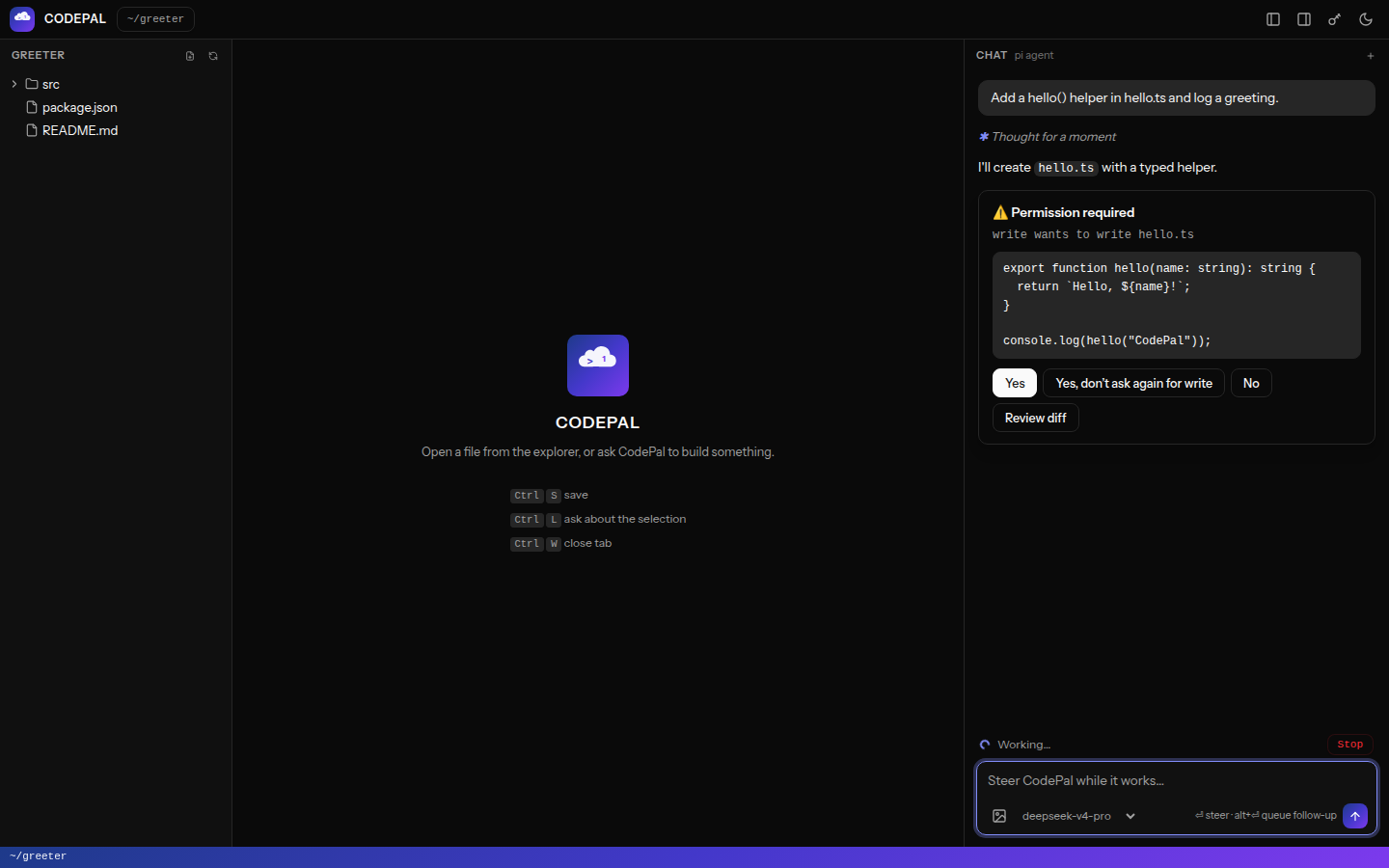
Nothing changes without asking
The agent can read your files on its own, but anything that changes your machine asks first: running a command, editing a file, writing a new one. The permission card shows what it wants to do, and for edits Review diff opens the proposed change in a side-by-side diff before you say yes. If you trust it with a kind of action for the rest of the conversation, "Yes, don't ask again" covers that.
When you approve a change, it lands in the editor:
- A file you have open, with no unsaved edits, updates in place as a single undo step, so Ctrl+Z takes the agent's change back out.
- A file you're in the middle of editing is left alone and marked "changed on disk", with Reload from disk and Keep mine. Your unsaved work never gets overwritten.
- A file you didn't have open opens in a new tab, without stealing focus if you're typing.
- Every change gets Open and Diff buttons in the chat, and the file is marked in the explorer.
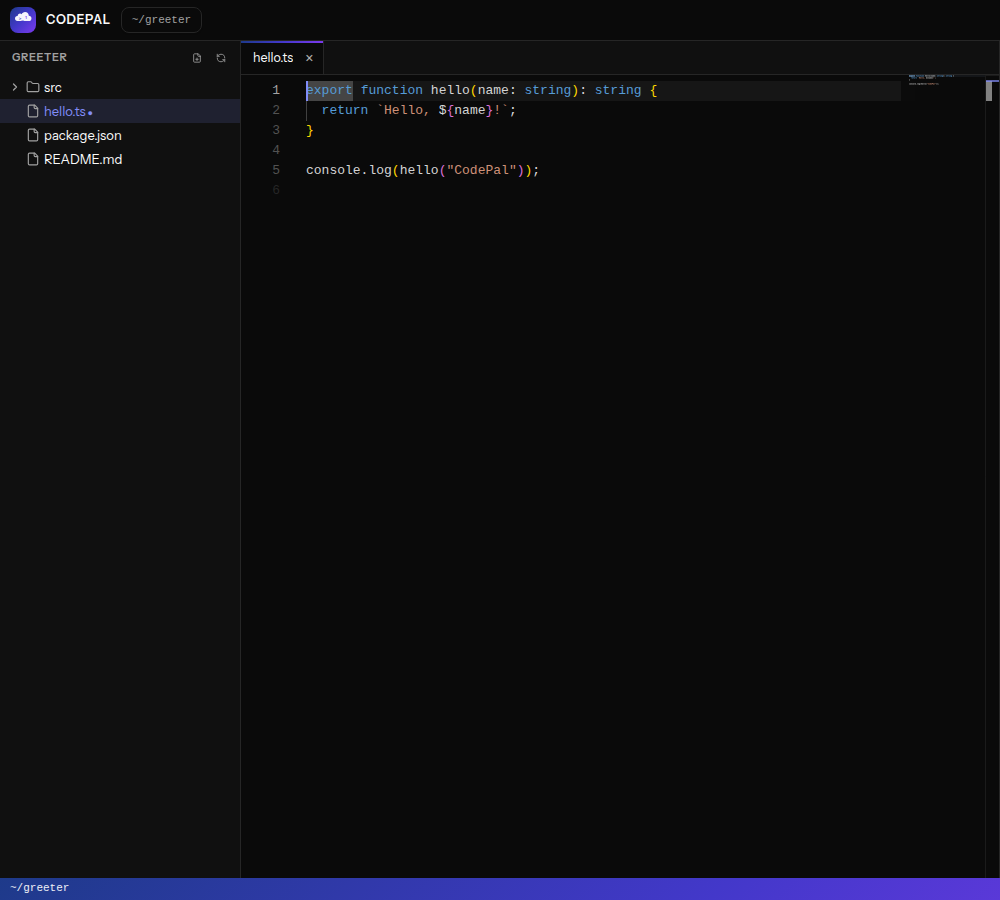
The editor is VS Code's
CodePal's editor is Monaco, the editor inside VS Code: syntax highlighting for around 80 languages, IntelliSense for TypeScript, JavaScript, JSON, CSS and HTML, find and replace, multi-cursor editing, the minimap and the command palette (F1). Click a file in the explorer to open it; Ctrl+S saves.
Ask about what you're looking at
The chat box shows a chip for the file you have open, and adds your selection when there is one, as in greet.ts:10-24. That goes along with your message, so "explain this" or "fix this function" means exactly the code in front of you. Select some code and press Ctrl+L to jump to the chat with it attached; click the chip to leave it out.
Steer it while it works
You don't have to wait for the agent to finish before saying something. While it's working, Enter sends a steering message it reads after its current step ("use the existing helper instead"), and Alt+Enter queues a follow-up for when it's done. Stop halts the run but keeps the conversation, and you can switch models mid-conversation.
Careful with code you didn't write
A cloned repository can carry its own agent settings and extensions, and running those the moment you open the folder would be a way in for someone else's code. When a folder has them, CodePal asks once whether you trust it. Not trusting the folder still works; those project settings are just skipped. Your project's AGENTS.md or CLAUDE.md, if it has one, is read as context either way.
Getting started
- Download CodePal for Windows or Ubuntu from the front page and install it.
- Click Connect with cloudcode.one. Your browser opens, you approve, and the app fetches your key and stores it encrypted on your machine. There's nothing to copy and paste.
- Open a project folder (Ctrl+O), pick a model, and ask for something.
| Shortcut |
Does |
| Ctrl+S |
Save |
| Ctrl+O |
Open a folder |
| Ctrl+L |
Ask about the selection |
| Ctrl+B / Ctrl+J |
Show or hide the explorer / chat |
| Ctrl+Shift+N |
New conversation |
| Enter / Alt+Enter while it works |
Steer / queue a follow-up |
Coming from Harness?
CodePal installs alongside Harness rather than replacing it, so you can try it without giving anything up. Sign in once with Connect with cloudcode.one and it uses the same account and credit. Harness keeps working, but new features will land in CodePal.
Good to know
- Conversations aren't saved yet. Each one lives until you close the app or start a new one. When a conversation grows very long, CodePal compacts the older part so you can keep going.
- No telemetry. CodePal turns off the usage telemetry of the agent it's built on, pi, unless you switch it back on yourself.
- Windows and Ubuntu for now. There's no macOS download yet; on a Mac, the setup guide covers Claude Code and the other tools.
- It's free. The app costs nothing; what the agent does runs on your pay-as-you-go credit, at the prices on the front page.
New here? Create an account, top up from $2 or redeem a coupon, then download CodePal and connect.